

How We Help Container Depots & Repair Teams
Comprehensive Inspection & Damage Assessment Tools
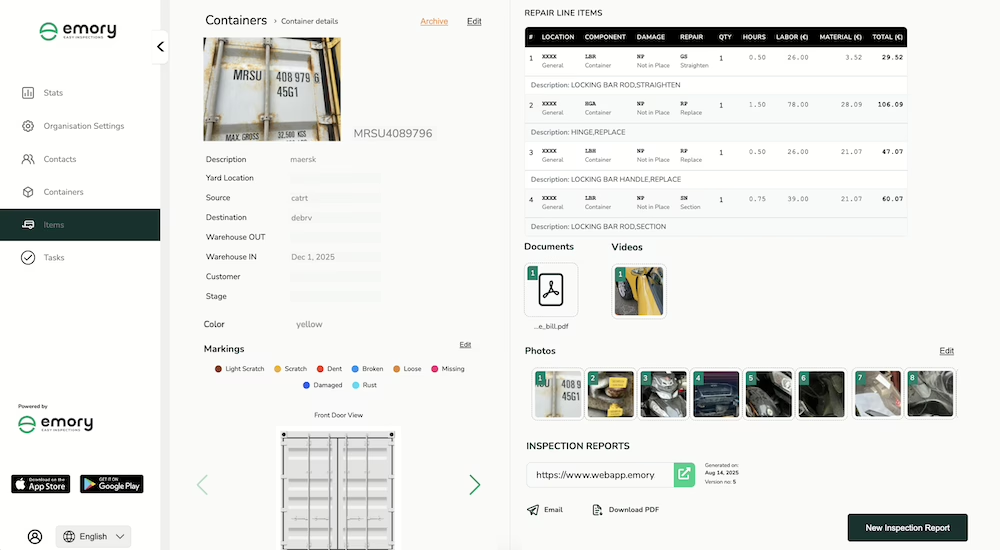
Standardise gate-in and gate-out container inspections with structured digital workflows aligned to industry inspection standards. Capture dents, cracks, corrosion, door damage, and structural defects using standardised damage codes — with annotated photos — directly on mobile, at the container, not later in the office.
Tailored Onboarding for Repair Technicians
Equip gate inspectors and repair technicians with structured mobile workflows built around real M&R routines. Guide every inspection using standardised damage code categories ensuring consistent assessments that match the expectations of shipping lines and lessors across every shift and every inspector.
Full Repair Tracking & Control
Maintain complete M&R records for every container moving through your depot. Track repair estimates, approvals, and work history in one place. Generate digital Equipment Interchange Receipts (EIR) at gate-in and gate-out – including photos, damage codes, and digital signatures, ready to share instantly with shipping lines and lessors.
Optimized Inspections for Container Repair & Depot Operations
Simplify the work of your depot teams and reduce repair delays across your container operations. Enable fast, consistent, and fully digital inspections with clear workflows that help technicians document damages, estimate repairs, and stay compliant with industry standards.
- Capture standardised damage-code assessments directly on mobile at gate-in and gate-out
- Generate digital Equipment Interchange Receipts (EIR) with photos, damage codes, and signatures — instantly shareable
- Submit M&R cost estimates digitally, with approvals from shipping lines and lessors — no email back-and-forth
- Operates reliably in low-connectivity depots with offline mode — auto-syncs when internet is restored
- Retrieve any container’s complete inspection and repair history by container number in seconds
EASE OF USE
Digital Signature
Approve inspections without the paperwork. With Emory Pro’s seamless digital signature feature, you can sign documents directly in the inspection checklist app, ensuring faster approvals, accuracy, and compliance.
QR Code Scanning
Speed up inspections with built-in QR code scanning. Instantly access, verify, and update records, reducing errors and keeping your quality control checklist app efficient and reliable.
Multi-Language
Work without barriers. Emory Pro supports multiple languages, helping teams complete inspections smoothly and making it a truly global quality control app.
Install the App on your Phone
Carry out container inspections and record repair details directly on your mobile device with Emory Pro.

FAQ’s
Yes. Emory Pro generates digital Equipment Interchange Receipts (EIR) at both gate-in and gate-out. Each report includes annotated photos, damage codes, container number, timestamps, and digital signatures – ready to share instantly with customers, lessors, and shipping lines.
Once damage is recorded and repair estimates are created in Emory Pro, the M&R proposal is submitted digitally to the relevant party, shipping line, lessor, or customer. They can review line items, approve or dispute directly within the platform, with a complete audit trail for every decision.
Yes. The Emory Pro mobile app supports full offline inspection capture including damage coding, photos, and signatures. All data syncs automatically once connectivity is restored, with timestamps preserving both inspection and sync activity.