
Why Inspection Data Becomes Unusable During Compliance Audits?

Why Inspection Data Becomes Unusable During Compliance Audits

Organisations that fail compliance audits often fail not because their inspections were inadequate, but because their inspection data was unusable when an auditor needed to rely on it. The inspections happened. The findings were recorded. But when the auditor asked specific questions, when did this inspection occur? who reviewed this finding? what action was taken?, the data could not provide answers.

Unusable inspection data is not the same as missing inspection data. The records exist. They simply cannot do what inspection data is supposed to do in an audit context: demonstrate, with sufficient precision and integrity, that an organisation’s inspection process was followed correctly.

Understanding why inspection data becomes unusable, the specific technical and procedural failures that cause it, is the starting point for building inspection data practices that survive audit scrutiny.
Failure Type 1: Timestamps That Cannot Be Trusted

Failure Type 1: Timestamps That Cannot Be Trusted

The most common reason inspection data fails in an audit is timestamps that do not establish when an inspection actually occurred.

Auditors are not just checking whether inspections were completed, they are checking whether inspections were completed on time, in sequence, and before the event or period they are supposed to cover. A vehicle pre-departure inspection is only useful as compliance evidence if it can be demonstrated that the inspection occurred before the vehicle departed, not after an incident was reported.

Inspection records with timestamps reflecting data entry, report generation, or system upload rather than actual inspection time cannot satisfy this requirement. The auditor cannot determine from the timestamp whether the inspection preceded or followed the event in question. The data is ambiguous, and ambiguous data is unusable data.

Failure Type 2: Records That Cannot Be Located

Failure Type 2: Records That Cannot Be Located

In many organisations, inspection records are stored across multiple systems: paper records in physical files, photographs in shared drives, reports in email inboxes, and digital forms in a separate inspection application. When an auditor requests all inspection records for a specific asset, period, or location, the retrieval process requires searching across multiple systems, formats, and locations.

In practice, records are missed. The paper checklist for a specific inspection is in a filing cabinet in a different office. The photographs are in a personal shared drive folder that the person who created it has since left the organisation. The email with the inspection summary was not filed systematically and cannot be located in a search.

The result is incomplete audit evidence, not because the inspections were not conducted, but because the records are not retrievable as a complete set.

Failure Type 3: Data That Cannot Be Verified as Unaltered

Failure Type 3: Data That Cannot Be Verified as Unaltered

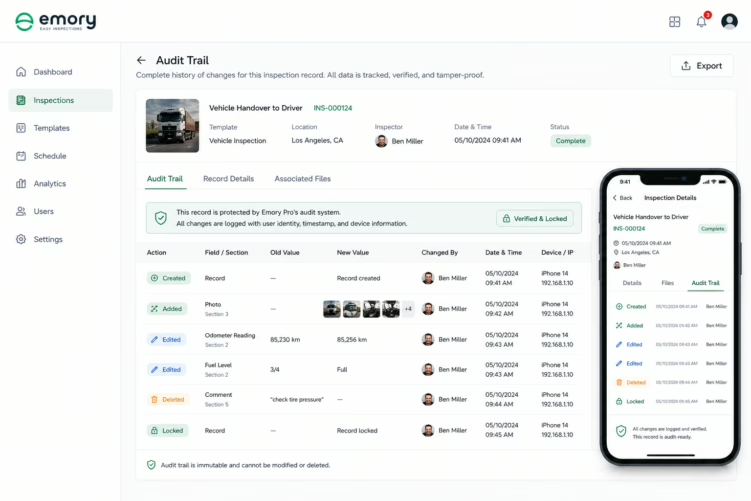
Inspection records that can be edited after submission without any trace of the modification create a fundamental problem for audit purposes. An auditor reviewing a record needs to be confident that the record reflects the actual inspection findings, not findings that were adjusted after a problem was identified or a claim was filed.

If an inspection system allows retrospective editing of submitted records, every record in that system is under a cloud of potential alteration. The auditor cannot distinguish between a record that was submitted correctly and a record that was modified after the fact. This makes the entire dataset unreliable for audit purposes, even if the vast majority of records are accurate.

Failure Type 4: Finding Data Without Resolution Data

Failure Type 4: Finding Data Without Resolution Data

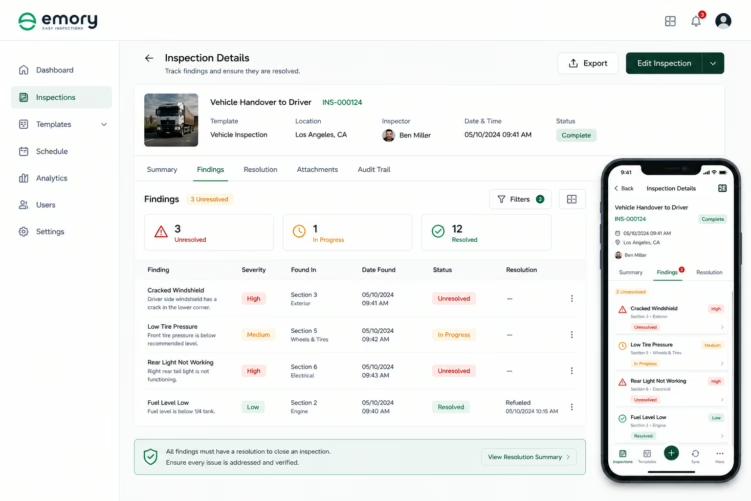
Compliance auditors reviewing inspection data are not just assessing whether inspections were completed, they are assessing whether the organisation’s inspection process functions as a quality and safety management system. This means they want to see that findings were acted on, not just recorded.

Inspection data that shows findings without resolution data tells an auditor that the organisation captured defects but cannot demonstrate that it responded to them. This is, in some respects, more damaging than no inspection data at all: it shows that the organisation knew about problems and cannot prove it addressed them.

The gap between finding and resolution is one of the most common audit failure points for organisations that have good inspection capture but poor workflow management.

Failure Type 5: Data That Cannot Be Aggregated Meaningfully

Failure Type 5: Data That Cannot Be Aggregated Meaningfully

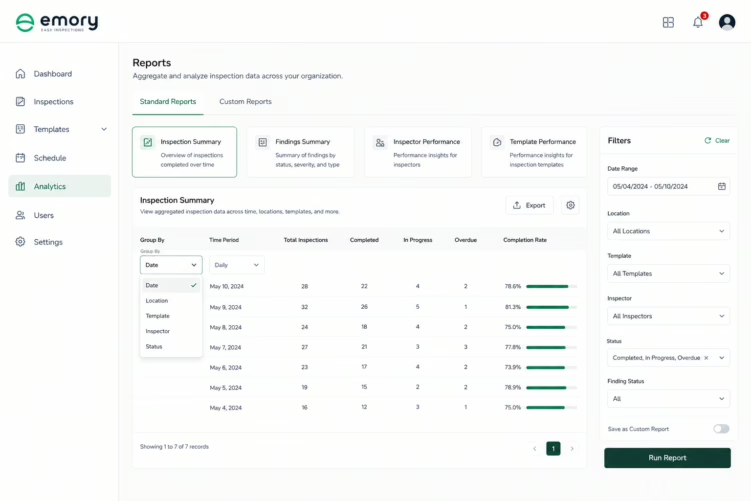
Audits often require not just individual inspection records but aggregate data: how many inspections were completed in a period, what was the pass rate, what categories of findings were most common, what was the average time from finding to resolution.

If inspection data is stored in formats that cannot be queried and aggregated, paper records, individual PDF reports, email summaries, this information does not exist in usable form. An auditor who asks for the inspection completion rate for a specific asset type over a six-month period will receive either a manual count (time-consuming, error-prone) or an admission that the data cannot be retrieved in that form.

For audits in regulated industries, the inability to provide aggregate data on inspection performance is itself a compliance finding, it demonstrates that the organisation cannot monitor its own inspection process effectively.

Building Inspection Data That Survives Audit

Building Inspection Data That Survives Audit

The common thread across all five failure types is that inspection data becomes unusable when it is designed for capture rather than for verification. The question an inspection system should answer is not just ‘what did the inspector find?’ but ‘how do we know this record is accurate, complete, and unaltered?’

The technical requirements for audit-grade inspection data are:

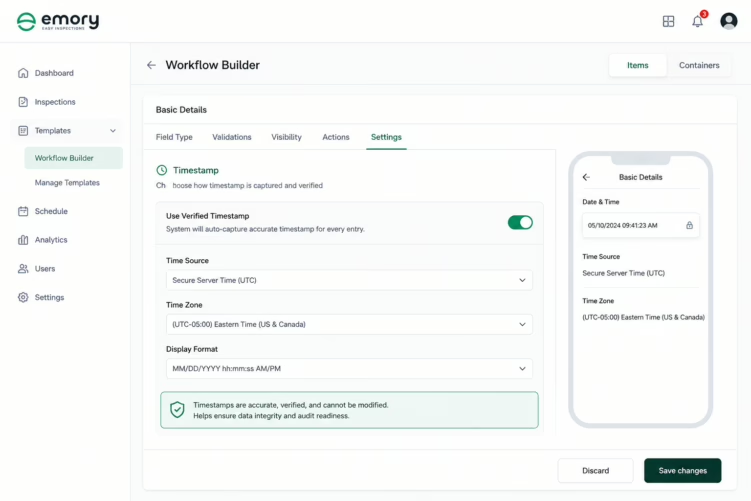
  • System-generated timestamps at the point of capture, not editable by the inspector, not generated at report export
  • GPS metadata embedded in the record at the time of capture
  • Immutable submission, records locked on upload, with modifications creating versioned records that reference the original
  • Centralised, queryable storage, all records in a single system, accessible by period, asset, location, and finding type
  • Finding-to-resolution linking, every finding has a documented route to review and resolution within the same system
  • Access and modification logs, every view and change event recorded with identity and timestamp
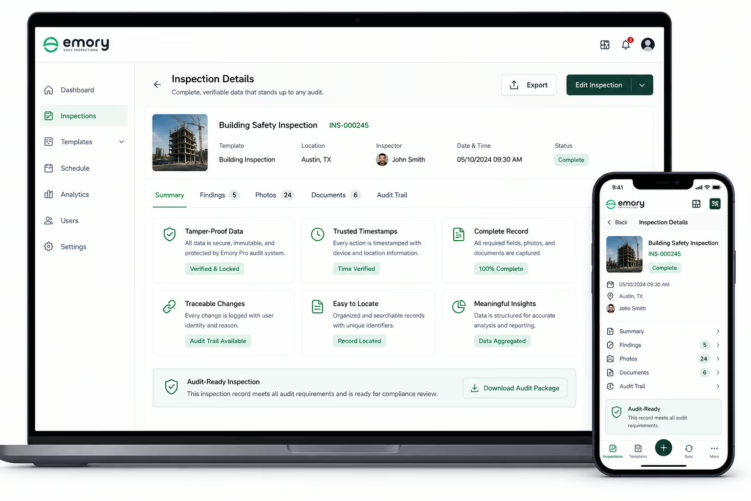
The test for audit-grade inspection data: can an auditor, without relying on anyone’s verbal testimony, verify that a specific inspection occurred at a specific time and place, that the record was not altered after submission, that findings were reviewed and acted on, and that the organisation’s inspection process met the required frequency and standard?

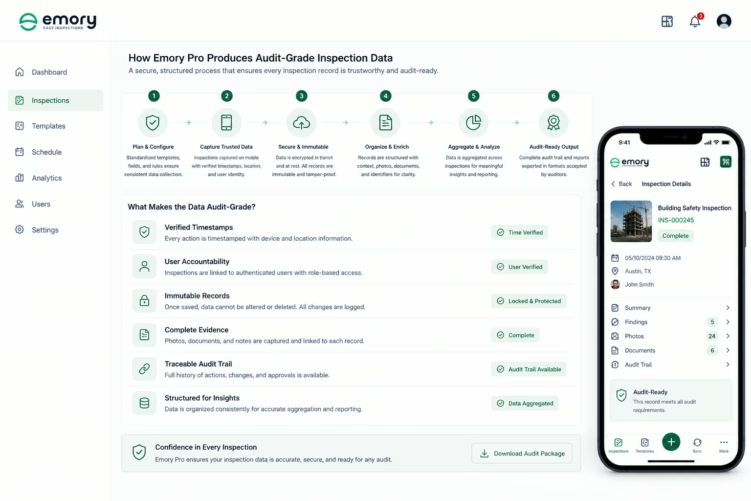
How Emory Pro Produces Audit-Grade Inspection Data?

How Emory Pro Produces Audit-Grade Inspection Data?

Emory Pro’s data architecture is designed around the requirements of compliance audit, not just operational capture. Every inspection record carries a timestamp generated at the point of capture for each inspection item, not at report generation. GPS coordinates are embedded at the same point. Records are locked on submission.

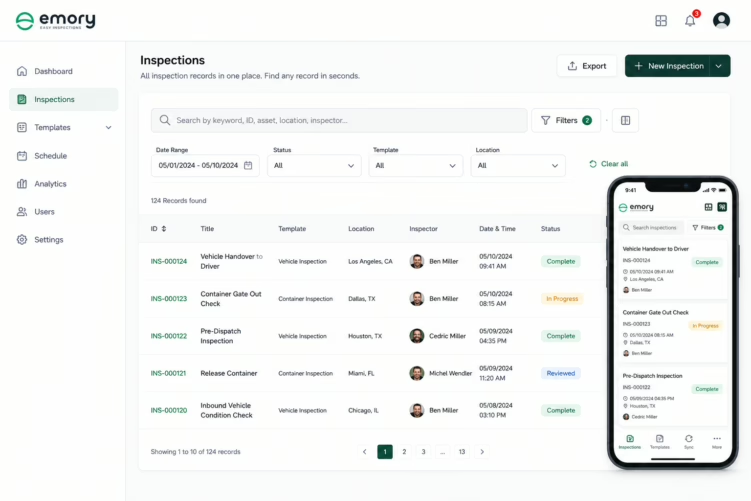
The platform’s centralised database supports queryable reporting across all inspection records: by period, asset, location, inspector, finding type, and resolution status. Auditors, or internal compliance teams preparing for external audit, can retrieve aggregate data directly from the platform rather than reconstructing it from individual records.

Finding resolution is tracked within the platform from initial recording through review, action, and closure. The audit trail for each finding shows the complete chain from capture to resolution, with timestamps and user identity at every step.

Key Takeaway: Inspection data becomes unusable in audits for five predictable reasons: unreliable timestamps, unlocatable records, unverifiable integrity, missing resolution data, and inability to aggregate. Each of these is a system design failure, not an inspector behaviour failure. Addressing them requires inspection infrastructure built for verification, not just capture.

FAQ’s

Because it lacks trusted timestamps, traceability, integrity, resolution tracking, or aggregation

With system-generated timestamps, GPS tagging, and locked (immutable) records.

Yes. All records are centralised and searchable by time, asset, or location.

Start your free trial today.

Teams adopt Emory Pro not when inspections fail—but when evidence starts getting questioned.