Digital Vehicle Handovers Complete Condition Records

Digital Vehicle Handovers Complete Condition Records

Digital Vehicle Handovers Complete Condition Records

Digital handovers built for compliance: condition, mileage, fuel, equipment, photos, damage, documents and signatures in one connected record, online or offline

Digital handovers built for compliance: condition, mileage, fuel, equipment, photos, damage, documents and signatures in one connected record, online or offline

Digital Vehicle Inspection
Automotive  Inspection

One Platform for Every Vehicle Workflow

One Platform for Every Vehicle Workflow

From handover to follow-up, every vehicle interaction is documented, time stamped and connected to a single record.

Handovers with mileage, fuel level and equipment recorded

Capture ISO and CEDEX damage codes

Driver’s licence and document verification at handover

Damage documentation tied directly to the vehicle

Tasks created from findings and assigned for follow up

Service due dates tracked and maintenance scheduled

Fleet wide inspections across locations and teams

Dealership and remarketing condition reports

Instant Repair Cost Estimates

Instant Repair Cost Estimates

Upload your rate card once, Emory Pro calculates and displays repair cost estimates automatically as inspections are completed, no manual pricing needed.

Upload a rate card (PDF, Excel, CSV or TXT)

Costs calculated automatically from checklist findings

Costs calculated automatically from checklist findings

Generate repair estimates in minutes

AI damage recognition, auto-mapped to repair line items

Default currency, labor rate and VAT applied per report

Flags items that need review before sharing

Shareable estimate, clearly marked as non-binding
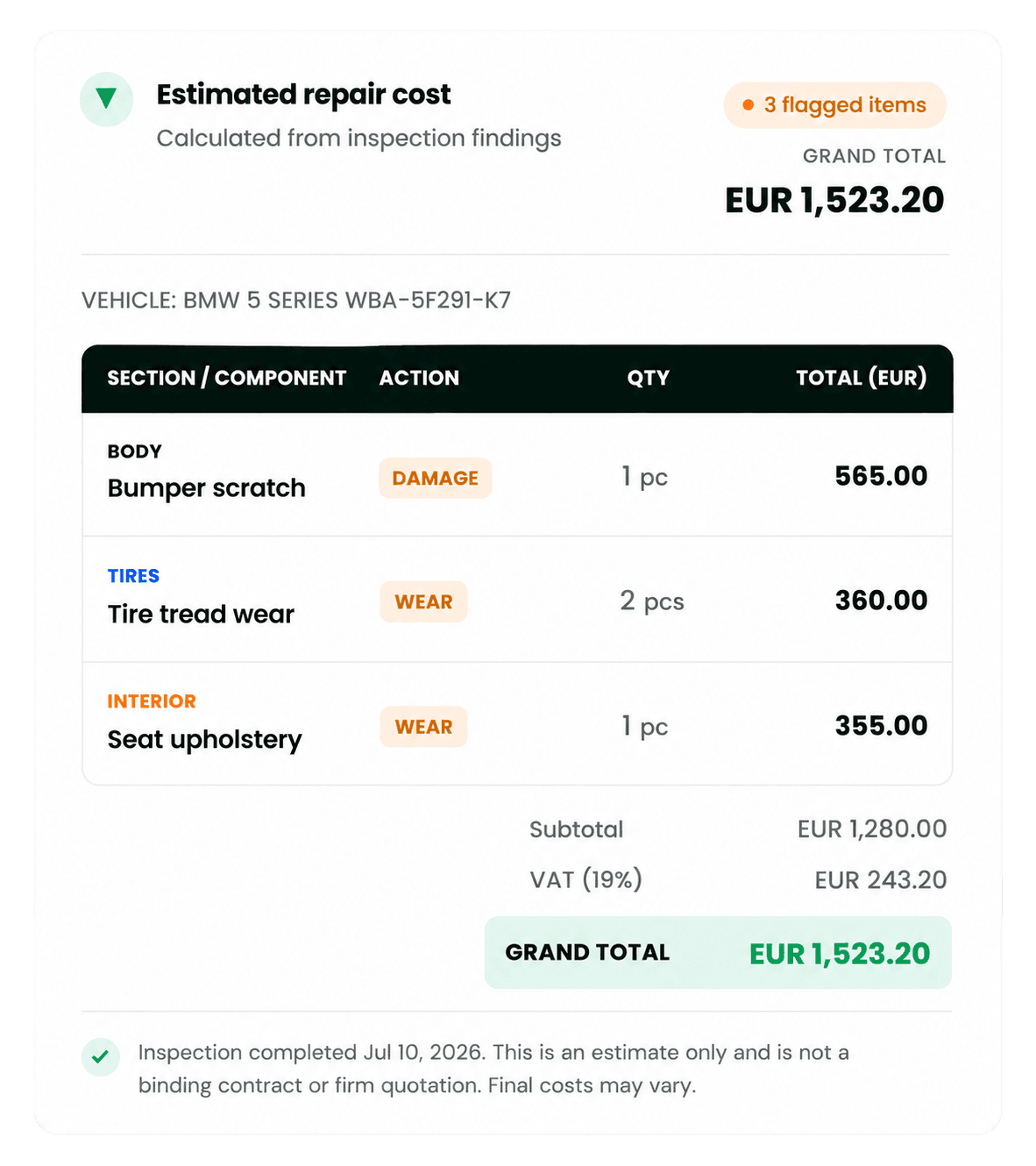
Estimated Repair Cost
Configure Your Own Inspection Workflows

No development work, no code, administrators configure it directly

No development work, no code, administrators configure it directly

Asset Types
Asset Types

Define vehicle types, fields and attributes

Adapt to cars, vans, trucks or fleet units

No developer involvement required

Inspection Types & Checklists

Build checklists for handovers, service or acceptance

Reuse and adapt templates across teams

Update instantly, no release cycle

Stages, Workflows & Tasks

Configure approval and follow-up stages

Create tasks from inspection findings and assign them to a team, employee or ground staff

Track tasks through resolution without switching systems

PHOTO DOODLE & ASSET BLUEPRINTS

PHOTO DOODLE & ASSET BLUEPRINTS

Mark Damage on the Photo or the Diagram

Draw directly on vehicle photos or mark defects on a vehicle blueprint, then compare condition between pickup and return. Every mark becomes an unambiguous, time-stamped part of the inspection record

Automotive inspection documenting structural damage and condition

Photo Doodle

Photo Doodle

Photo Doodle

Draw and mark damage directly on vehicle photos for clear visual evidence

Draw and mark damage directly on vehicle photos for clear visual evidence

Draw and mark damage directly on vehicle photos for clear visual evidence

Asset Blueprints

Asset Blueprints

Asset Blueprints

Mark damage and defects on a vehicle diagram for an unambiguous inspection record

Mark damage and defects on a vehicle diagram for an unambiguous inspection record

Mark damage and defects on a vehicle diagram for an unambiguous inspection record

Vehicle Inspection Workflow

From identification to resolution, every handover follows the same reliable path

01

1

Identify

Identify

Open the vehicle record or scan the QR code

02

2

Inspect & Verify

Inspect & Verify

Inspect & Verify

Capture condition, mileage, fuel, equipment and required documents

03

3

Document

Document

Document

Capture photos, mark damage and compare vehicle condition

04

4

Sign & Handover

Sign & Handover

Sign & Handover

Complete the digital handover with driver, customer or inspector sign-off, and share the report

05

5

Assign & Resolve

Assign & Resolve

Assign & Resolve

Create tasks from findings, assign responsibility and track followup

Built for Fleet Operators, Rental Companies and Automotive Teams

From rental return to remarketing, one platform, connected records

From rental return to remarketing, one platform, connected records

Vehicle Inspection & Handover

Check-in and check- out inspections

Mileage, fuel level and equipment checks

Driver’s licence and document verification

Photo and video evidence

Digital driver or customer sign off

Complete digital handover record

Damage Documentation

Scratches, dents and wheel damage

Photo Doodle annotations

Damage marking on vehicle blueprints

Before and after comparison from pickup to return

Interior and exterior condition

Interior and exterior condition

Vehicle Records & Service Tracking

Complete inspection and handover history

Documents and supporting files

Upcoming service due dates

Maintenance scheduling

Open and completed tasks

Centralised vehicle history

Every Vehicle, One Connected Record

Inspections, photos, damage markings, documents, signatures, tasks and reports stay connected to the vehicle, creating a complete digital record from handover to resolution
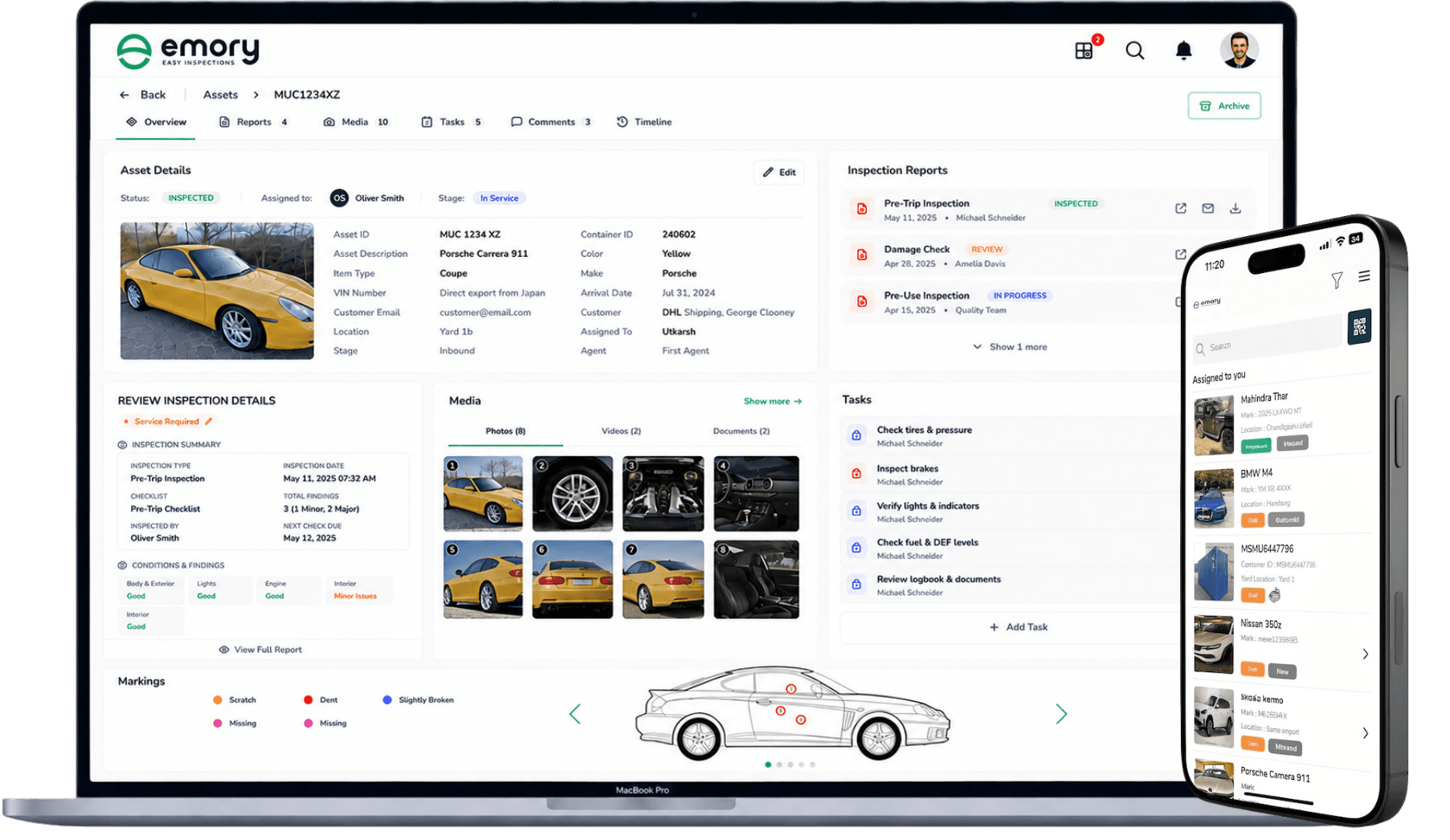
Web dashboard showing automotive inspection results

Photo Doodle

Photo Doodle

Photo Doodle

Asset Blueprints

Asset Blueprints

Asset Blueprints

Offline-First

Offline-First

Offline-First

Zero-Code Configuration

Zero-Code Configuration

Zero-Code Configuration

GDPR Compliant

GDPR Compliant

GDPR Compliant

Digital Handover Reports

Digital Handover Reports

Digital Handover Reports

Measurable Impact on Automotive Operations

Faster inspections. Fewer disputes. Full traceability

Faster Inspections
Faster Inspections

Standardized checklists and mobile capture cut inspection time at every touchpoint

Standardized checklists and mobile capture cut inspection time at every touchpoint

100,000+ Offline
100,000+ Offline
100,000+ Offline

Asset records available on-device, no connectivity required

Asset records available on-device, no connectivity required

Zero Code Setup
Zero Code Setup
Zero Code Setup

Asset types, checklists and workflows configured without development work

Asset types, checklists and workflows configured without development work

Handover Ready
Handover Ready
Handover Ready

Photos, markings, documents, signatures and tasks stay linked to every vehicle record

Photos, markings, documents, signatures and tasks stay linked to every vehicle record

Photos, markings, documents, signatures and tasks stay linked to every vehicle record

Replace Paper-Based automotive Inspections

See the difference a digital inspection platform makes

Frequently Asked Questions

Not here? Just reach out

Not here? Just reach out

01.

Can Emory Pro reduce disputes over vehicle damage?

Yes. Photo Doodle and Asset Blueprints create clear, time stamped visual evidence tied directly to the vehicle record, removing ambiguity about when and where damage occurred.

02.

Does it work without an internet connection?

03.

Can we configure our own inspection types and checklists?

04.

What happens when an inspection finds an issue?

01.

Can Emory Pro reduce disputes over vehicle damage?

Yes. Photo Doodle and Asset Blueprints create clear, time stamped visual evidence tied directly to the vehicle record, removing ambiguity about when and where damage occurred.

02.

Does it work without an internet connection?

03.

Can we configure our own inspection types and checklists?

04.

What happens when an inspection finds an issue?

Ready to Digitise Inspections?